01
Connect your business
Add your phone, messaging channels, business information, hours, availability, and the details LeadCaptain needs to represent your business.
Answer customers, capture leads, and stay connected to what’s happening in your business. LeadCaptain works with your customers and your team, all from one intelligent front office.

LeadCaptain is the AI front office that answers your calls, replies to your messages, and captures every lead so your business keeps moving 24/7, even when you can't pick up.
One intelligent front office across every channel your customers use
Customers call, text, DM, chat, submit forms, and send email. LeadCaptain keeps those conversations connected to one customer record so your team can see what happened and what should happen next.
 Phone
Phone SMS
SMS Instagram
 Messenger
 WhatsApp
 Web Chat
 Email
Email Forms
Forms
“Hi, I needed someone today… I'll try the next company.”
A slow reply or a full voicemail box sends leads straight to the next business. Staying available shouldn't mean staying glued to your phone.
calls to small businesses go unanswered during busy hours
is when many customers reach out — and get voicemail instead
leads often book with whoever answers first
LeadCaptain doesn't just answer customers. It also helps your business internally. Call your assistant to ask about leads, appointments, missed calls, and follow-ups, and let it notify you or your team when something needs attention.
A customer-facing receptionist and an internal business assistant — two agents that share one context, so every conversation is handled and nothing falls through.


Two agents, one front office. Your team doesn't have to grow to keep up.
LeadCaptain keeps the entire customer journey moving — from the first call or message through your pipeline, appointment, estimate, invoice, and payment.
See every opportunity at a glance and move leads through each stage so your team always knows what needs attention next.
Create and send professional estimates using the customer and job information already captured in LeadCaptain.
Turn approved work into an invoice without re-entering customer information or switching to another system.
Accept payment and keep it connected to the customer, conversation, and work that led to the sale.
One front office for every part of the customer journey. See what your team sees as leads move from conversation to opportunity, appointment, estimate, invoice, and payment.
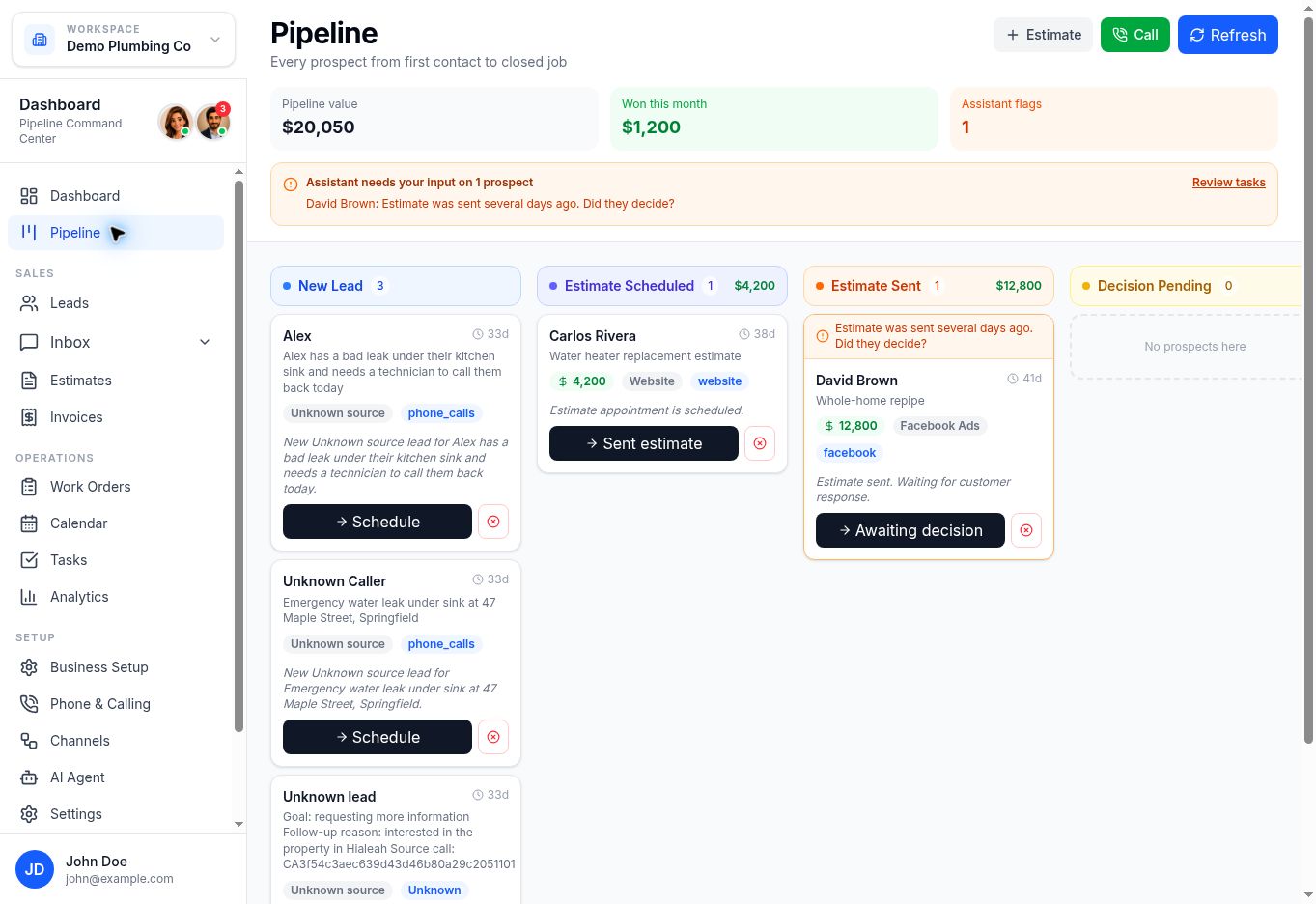
See new leads, active opportunities, estimates, and decisions in one visual pipeline so your team always knows what needs attention next.
Everything stays connected. What your AI agents do flows into the same front office your team uses.
LeadCaptain stays available after hours, answering customers, capturing leads, and keeping opportunities moving while your team is unavailable.
Connect your business once. LeadCaptain handles the customer, keeps the work organized, and gives your team one place to see what is happening.
Add your phone, messaging channels, business information, hours, availability, and the details LeadCaptain needs to represent your business.
Answer calls and messages, capture and qualify leads, schedule appointments, respond to questions, and keep follow-ups moving.
Pipeline, conversations, appointments, tasks, estimates, invoices, payments, and customer activity stay connected in one place.
Ask what's happening in your business, or let LeadCaptain proactively call or message the right person when something needs attention.
A separate assistant built for owners and teams — it organizes next actions, surfaces leads that need follow-up, and helps you stay on top of the day.

If a missed call or slow reply can cost you a customer, LeadCaptain keeps the front office covered.

HVAC, plumbing, electrical, roofing, and more — never miss a service call again.
Learn more
Respond to buyers and renters the moment they inquire.
Learn more
Clinics, dental, and med spas — book more appointments.
Learn more
Capture intake and route urgent matters.
Learn more
Keep every client conversation moving.
Learn moreYour business data and customer conversations are handled with care — with permissions, access controls, and clear customer control over how information is used.
Everything you need to know about your LeadCaptain front office.
LeadCaptain acts as your AI front office — it answers calls and messages, answers common questions, captures lead details, follows up, and hands off to your team when needed.
Both, as two separate products. The AI Receptionist is customer-facing and handles incoming conversations. The AI Business Assistant is internal and helps you and your team run the business behind those conversations.
Phone is available and SMS is in beta. Instagram DMs, Facebook Messenger, and WhatsApp are on the roadmap, with more channels planned. Each channel shows its current availability.
Yes. You set handoff rules, and your team can step in anytime with full context from the conversation.
No. You add your business details, configure your receptionist, connect your channels, and go live — no engineering required.
You can start free. Paid plans are based on your usage; pricing on this site is shown as placeholders until final pricing is published.
Start your 7-day free trial and see how LeadCaptain answers calls, responds to leads, and keeps every conversation moving.