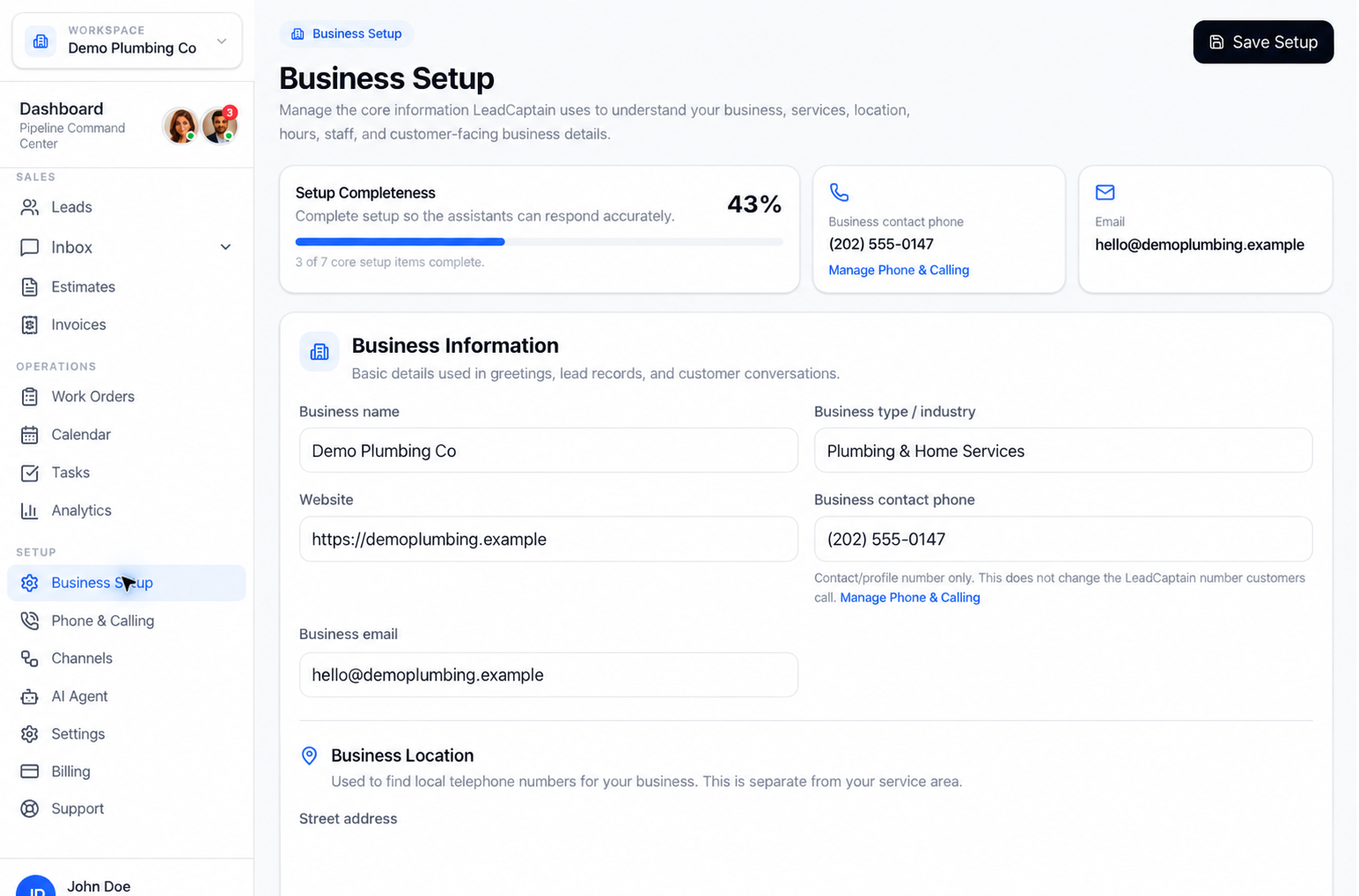
Set up your AI front office in a few simple steps
No engineering, no complicated tools. Add your business details, configure your receptionist, and go live — most owners are ready in an afternoon.
From sign-up to live in four simple moves
Here's the quick version. Below, we walk through every step so you always know what comes next.
Set up your account
Create your account and add your business details.
Configure your receptionist
Choose your greeting, tone, and what to capture.
Connect your channels
Connect phone and messaging so nothing is missed.
Go live & monitor
Turn it on and watch conversations and leads roll in.
Every step, in plain language
Seven guided steps take you from a brand-new account to a front office that answers every call and message.
Create your LeadCaptain account
Sign up in minutes with no credit card. You'll land in a simple dashboard built for business owners, not engineers.
Add your business information
Tell LeadCaptain about your business, hours, services, and the questions customers ask most. This is what your front office uses to help callers.
Configure your AI Receptionist
Choose a greeting, set the tone, and decide what details to capture from every conversation. Guided prompts walk you through each choice.
Connect phone and communication channels
Connect your phone and messaging so nothing gets missed. Follow the on-screen steps — no technical setup required.
Review preferences and handoff rules
Decide when a conversation should reach a person, who it goes to, and what counts as urgent. You stay in control of every rule.
Go live
Flip the switch and LeadCaptain starts answering calls, replying to messages, and capturing leads right away.
Monitor conversations, leads, and activity
Watch conversations, leads, and follow-ups roll in from one clear view. Adjust anything anytime as your business grows.
A few basics are all it takes to get started
You don't need special software or a technical team. If you can describe your business, you can set up LeadCaptain.
- Your business name, hours, and services
- The questions customers ask you most often
- A phone number or messaging channel to connect
- A few minutes to review your handoff preferences
Your business details
Hours, services, and answers to common questions power every conversation.
A channel to connect
Start with phone or messaging — add more channels whenever you're ready.
Handoff preferences
Decide when a person should step in and who receives the conversation.
A little bit of time
Guided setup means most owners are live the same day they start.
You stay in control the whole way
Setup is guided, reversible, and easy to adjust. Change your greeting, rules, or channels anytime — nothing is locked in.
Go at your own pace
Save your progress and finish setup whenever it suits you. There's no rush to go live.
Your team can always step in
A real person can take over any conversation with full context, so nothing important slips.
Change anything, anytime
Update rules, tone, and channels as your business grows. Your settings are always yours to edit.
Setup questions, answered
A few common questions about getting your front office up and running.
No. Setup is fully guided — you add your business details, configure your receptionist, connect a channel, and go live. There's nothing to code or install.
Most owners are ready in an afternoon. You can save your progress and finish whenever it's convenient.
Everything is editable. Update your greeting, handoff rules, hours, and channels anytime from your dashboard.
Yes. You set the rules for when a conversation should reach a person, and your team can step in anytime with full context.
No. Start with a single channel like phone, then add messaging channels whenever you're ready.
Ready to get your front office live?
Start free and follow the guided steps — you can be answering calls and capturing leads today.
LeadCaptain · Your AI front office